A knight lives on your taskbar
He walks right, forever, killing scarecrows while you work — and keeps at it while your machine is off. One small process, no engine, no web view, and nothing to look at unless you look down.
Or read the guide first — every number in the game is in it.
That strip is the real game, running in this page — the same tick, the same sprites, the same countryside, on a taskbar that is only pretending. On your machine it sits on the actual bar, and the gold goes where you tell it to.
01 What it does
Three things, then those three again
There is no hidden layer. The party walks right, meets the next group, and takes what its enemies were carrying. A floor is three to seven encounters; deeper fights grow as large as six against twenty. Everything you ever decide is what the party wears and what you buy.
Walk, and swing

Fifteen ticks a second, whatever the screen is doing. Within three paces of a scarecrow the party stops and starts hitting it.
Take its gear

One kill in seven drops something. Twelve kinds of item, four rarities, six slots each — and what they wear is what you see down on the bar.
Keep going without you

Shut the machine. On the way back in it reads the clock and works out the night in one step per kill — for as long as the party can stay standing.
02 What clicking does
One click opens the panel
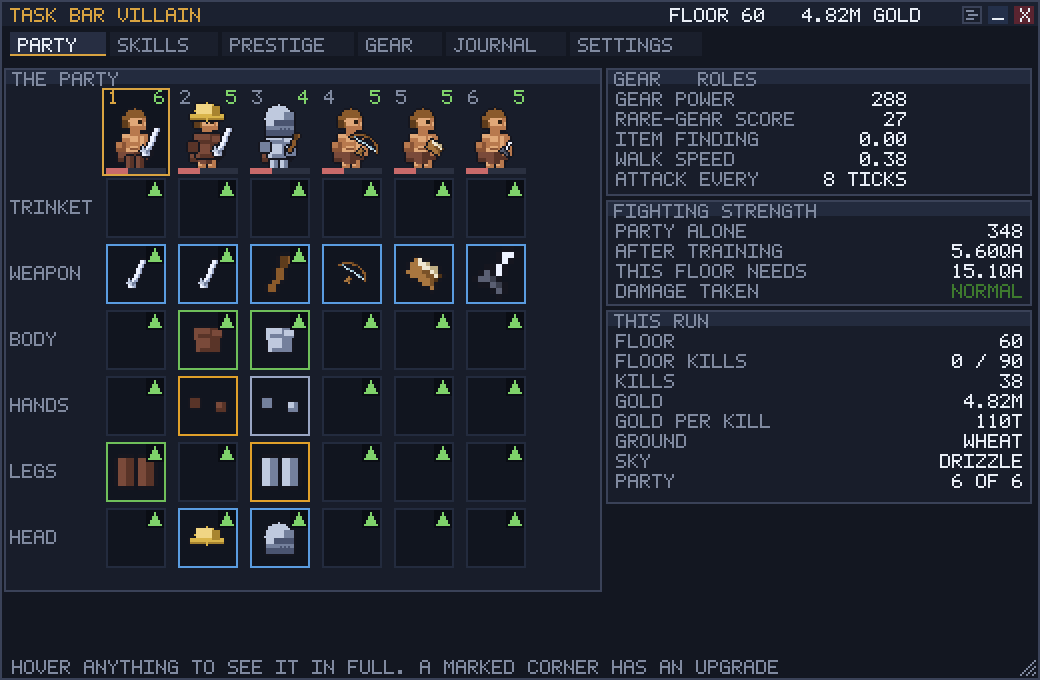
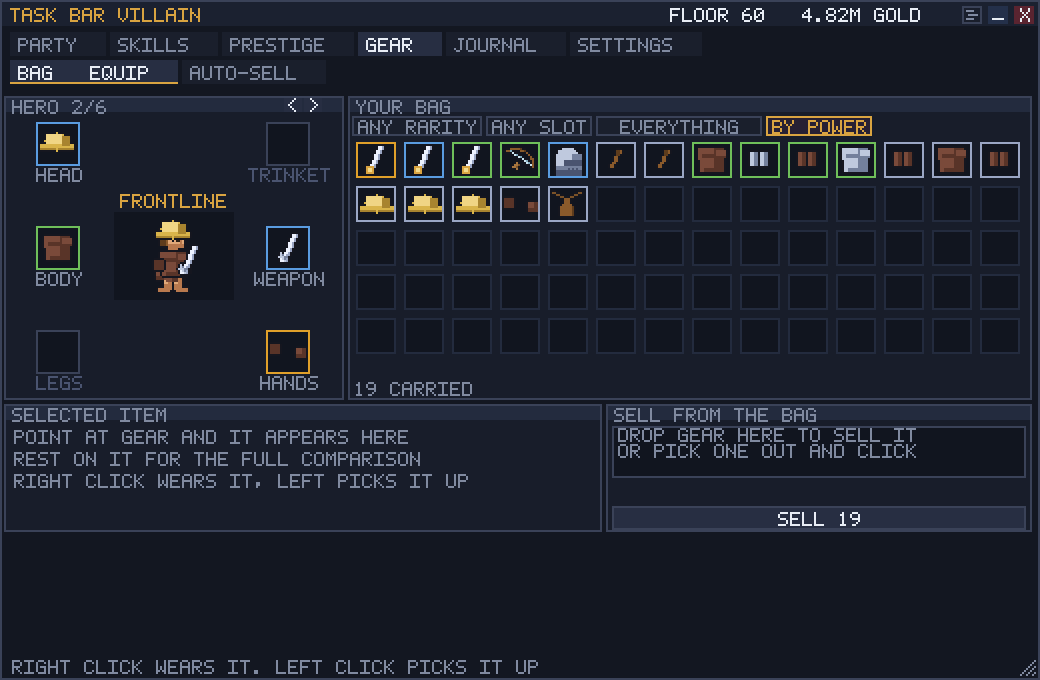
It is the rest of the game, above the strip: who is in the party, what they are wearing, what there is to buy, and the diagnostics behind every number on this page. Drag its cards around by their titles — they stay where you put them, TILE packs them back into a grid, and TIDY undoes whatever you did to them.
The rest of it is the mouse
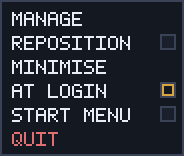
Right click the strip for this. MANAGE is the panel, MINIMISE collapses him to a coin and an arrow, and QUIT is the only thing that closes him.
AT LOGIN and START MENU are the two ways he stays on the machine, and both are off until you ask. Untick either and it is gone again — there is still no installer and nothing to uninstall.
REPOSITION is the one worth knowing. Tick it and the strip grows dotted handles: drag the middle to slide it along the bar, drag either end to make it longer or shorter, and three more rows appear in the menu — SIZE, FIT TO BAR and RESET SIZE.
Untick it and the strip goes back to being scenery: nothing on it can be moved by a press and the handles disappear. A taskbar resident is placed once and looked at for months, so the default is off — and wherever you left it is where it comes back.
Every one of those rows is on the panel too, under SETTINGS › THIS MACHINE, on a card called THE STRIP ITSELF — the same handles, the same size, the same two placement commands. Nothing here is behind the right click, which matters under Wine on Linux, where the menu draws but its rows do not answer a click. A left click on the strip opens the panel.
03 What it costs you
Idle games are meant to be invisible
Most of them are a browser wearing a costume — a few hundred megabytes and a fan that comes on. This one is a single small program that sits still: it doesn't chew through CPU, it doesn't sit on your memory, and there is no engine, no web view and no GPU context underneath it.
Diagnostics
- Processes
- 1Not a launcher and a runtime
- Engine
- NoneEvery pixel drawn by hand
- Web view
- NoneNo browser hiding in there
- Download
- 1582 KBOne file, no installer
You don't have to take my word for any of it: the game measures itself. The DIAG tab in the panel shows what it is costing you on your own machine — memory, processor, frame time, all of it live — which is a better answer than a number I measured on mine.
04 How it's built
Four decisions, and the rest follows
- Pure Rust, no dependencies
- No engine, no web view, no GPU context, and nothing in
Cargo.tomlbut the Windows API bindings. The font, the rasterizer, the sprite decoder and the big-number type are all in the box, which is most of why the download is half a megabyte. The headings on this page are that same font, converted. - A layered window
UpdateLayeredWindowtakes a finished premultiplied bitmap, so the window never answersWM_PAINT— there is no paint loop at all. The message pump blocks inGetMessageW, and a coalescable timer lets the kernel batch our wakeups with everyone else's instead of waking a core on our schedule.- Numbers that don't run out
- Counters are a mantissa-and-exponent pair rather than a
u64, because an idler's economy passes 18 quintillion in an afternoon and au64overflows in silence. Past the named suffixes it falls back to scientific notation. - Windows only, deliberately
- There was an X11 backend. It was cut: the thing being built is a Windows taskbar resident, and X11 could only ever approximate that on a desktop that happens to have a panel. Everything above the platform layer is still free of platform types, so a second backend is one file rather than a rewrite.
05 Read this first
Seven things to know before you run it
- It's a prototype. Version 0.40.0. Rough edges are the point, and the upgrade curve is illustrative rather than balanced.
- The .exe is signed. Windows may still show SmartScreen while a new build earns reputation. Check that the publisher is Jared Short; if it is not, do not run it.
- It updates itself. Every few hours it asks this site whether there's a newer build, and if there is, downloads it beside the running one and swaps it in the next time you quit — never underneath you. Nothing but the version number is sent. There's an off switch in the panel, and with it off the program never touches the network at all.
- Offline progress runs until the party falls, not against a clock. A week away is a week of walking if they can survive it — and if they can't, it stops where they were wiped and says so. A party stuck on a floor they can't clear will not grind their way past it overnight.
- Your save is plain text, in
%APPDATA%\task-bar-villain\save.txt. Delete it to start over; edit it if you'd rather cheat. - Vertical taskbars aren't handled. A side-docked bar has no room for a 16-pixel-tall strip, so he falls back to a band along the bottom of the screen instead.
- Windows 11 z-order is a fight, not a contract. He reclaims the top of the stack once a second. It works; it isn't guaranteed by anything.
06 Go on, then
One file, no installer
Put it wherever you like and double click it. Quit is in the right-click
menu, and the only thing it leaves behind is a text file in
%APPDATA%.
- Windows x64 · 1582 KB · .exe
- Linux dropped, see above
- macOS no build yet